
How to Use WeChat Pay as a Foreigner in China (2026 Setup Guide)
If you are planning a trip to China, you have probably heard the same advice a hundred times: “You need mobile payments.” It is true — in 2026, cash is quietly disappearing from much of daily Chinese life, and foreign credit cards are accepted almost nowhere outside international hotels. The two apps that run the entire country are Alipay and WeChat Pay.
Most guides cover Alipay and stop there. But ignoring WeChat Pay is a mistake. WeChat (微信, Wēixìn) is not just a payments app — it is the super-app that a billion people use to chat, hail rides, order food, book trains, and pay for everything in between. Setting up WeChat Pay as a foreigner used to be nearly impossible without a Chinese bank account. That changed in 2023, and by 2026 the process is genuinely approachable.
This guide shows you exactly how to set up WeChat Pay with a foreign passport and an international credit card, how to use it day-to-day, what the real limits and fees are (including the gap between the official numbers and what you will actually experience), and how it compares to Alipay.
The short version: Yes, foreigners can use WeChat Pay without a Chinese bank account. You need a passport, an international Visa or Mastercard, and about ten minutes before you fly.
Why WeChat Pay Matters for Your China Trip
Together with Alipay, WeChat Pay is one half of China’s “payment twins” — the two apps between them cover virtually 100% of merchants you will encounter. Credit card terminals are rare. Many street vendors, small restaurants, taxis, and even some ticket counters either cannot or will not take cash. Having WeChat Pay on your phone means you pay like a local: scan a QR code, confirm, done.
WeChat Pay has supported international cards in some form since 2019 (initially only at pilot merchants like 12306 train tickets, JD.com, and Trip.com). On July 20, 2023, Tencent officially opened the full WeChat Pay merchant network to foreign cards across every city and category — dining, transport, retail, and travel. This is the moment WeChat Pay became genuinely useful for visitors, and it has only improved since.
Can Foreigners Use WeChat Pay?
Yes. You do not need a Chinese bank account, a Chinese phone number, or a Chinese ID. You verify your identity with your passport and pay with an international credit or debit card.
Here is what the 2023 opening means in practice:
- You can bind cards from the major international networks: Visa, Mastercard, Discover (including Diners Club), and JCB. (Visa and Mastercard work most reliably. Some travelers also report American Express works, but support is inconsistent — confirm directly in the app before you travel.)
- Once bound, your card works for everyday spending at almost any merchant that takes WeChat Pay — street food, subway gates, ride-hailing, supermarkets, hotels.
- What you cannot do: send money person-to-person, send or receive red packets (红包), or top up a WeChat balance. International cards are restricted to consumer payments only — no transfers.
One-line note on the social side: WeChat is also China’s dominant messaging app (think WhatsApp + Facebook rolled into one). This guide focuses purely on payments; if you want the broader app, see What Apps to Download Before Going to China.
What You’ll Need Before You Start
Get these ready before you fly — setting up is far easier over home Wi-Fi than on a Chinese mobile network:
- Your passport (must be unexpired and valid).
- An international credit or debit card — Visa or Mastercard recommended. Avoid prepaid or “virtual” cards if possible (more on why in troubleshooting).
- A phone number that can receive SMS — your home mobile number is fine. It does not need to be a Chinese number, but it must be the same number your bank has on file for the card.
- The card details — number, expiry, CVV, and the exact name printed on the card.
Step 1: Download WeChat and Register
- Search for “WeChat” or “微信” on the Apple App Store or Google Play. Download it before you enter mainland China, because Google Play is not reachable from inside the country.
- Open WeChat and tap Sign Up.
- Register with your overseas phone number (the + prefix lets you pick any country). Most countries are supported.
- Enter the SMS code sent to your phone.
WeChat has an English interface — on first run, choose English as your language. The payment screens are well-translated, though a few labels may still appear in Chinese.
Step 2: Bind Your International Card
This is the core step. Once your card is bound, you can pay.
- Go to Me > Services > Wallet > Cards (Me > 支付与服务 > 钱包 > 信用卡/扣账卡).
- Tap Add a Card (新增卡) and agree to the terms.
- Select your identity document — choose Passport (护照).
- Enter your identity details exactly as they appear on your passport and card:
- Full name (matching the card exactly, including capitalization, spaces, and hyphens)
- Passport number
- Country/region
- Enter your card number, expiry date, and CVV.
- The phone number field must be the one your bank has on file for that card. WeChat sends an SMS code to it — enter the code to confirm.
- Set a 6-digit payment PIN. You will use this for every payment.
Acceptable identity documents (six types): passport, Mainland Travel Permit for Hong Kong/Macau residents, Mainland Travel Permit for Taiwan residents, Hong Kong/Macau Residence Permit, Taiwan Residence Permit, or Foreign Permanent Resident ID Card. For almost all visitors, that means passport.
Don’t panic at the ¥0 charge. Right after binding, you may see a ¥0.00 (or ~$0) pre-authorization on your card. This is just a verification check — it is automatically canceled within about 30 days. It is not a fee.
Step 3: Identity Verification (Required)
Chinese financial regulations require real-name verification (实名认证) on all payment accounts for anti-money-laundering and KYC reasons. You cannot activate the wallet or bind a card without it. The good news: when you bind a card with your passport (Step 2), verification happens as part of the same flow.
- If your details all match (name, passport, phone, card), verification usually completes within minutes.
- The most common reason for rejection is a mismatch between the name on your card and the name you entered — even a missing hyphen or different capitalization can trigger it. Copy the name character-for-character from your card.
Community tip (from real travelers): If the app forces you to bind a Chinese bank card during verification and won’t let you proceed, try the order bind the foreign card first, then complete verification — some users report this avoids the “Chinese bank card required” trap. Also, registering WeChat with a non-Chinese phone number from the start tends to avoid being asked for a Chinese bank account at all.
How to Pay in Daily Life
Once set up, paying is fast. There are two motions you will use constantly:
- Scan the merchant’s QR code (主动扫码): Tap the + at the top right of the WeChat home screen → Scan (扫一扫) → point at the merchant’s printed QR code → enter the amount → confirm with your PIN. Use this at small shops, street vendors, and markets.
- Show your payment code (被扫/付款码): Go to Me > Services > Payment Code (付款码) and hold your screen up to the merchant’s scanner. Use this at convenience stores and supermarkets with a fixed scanner.
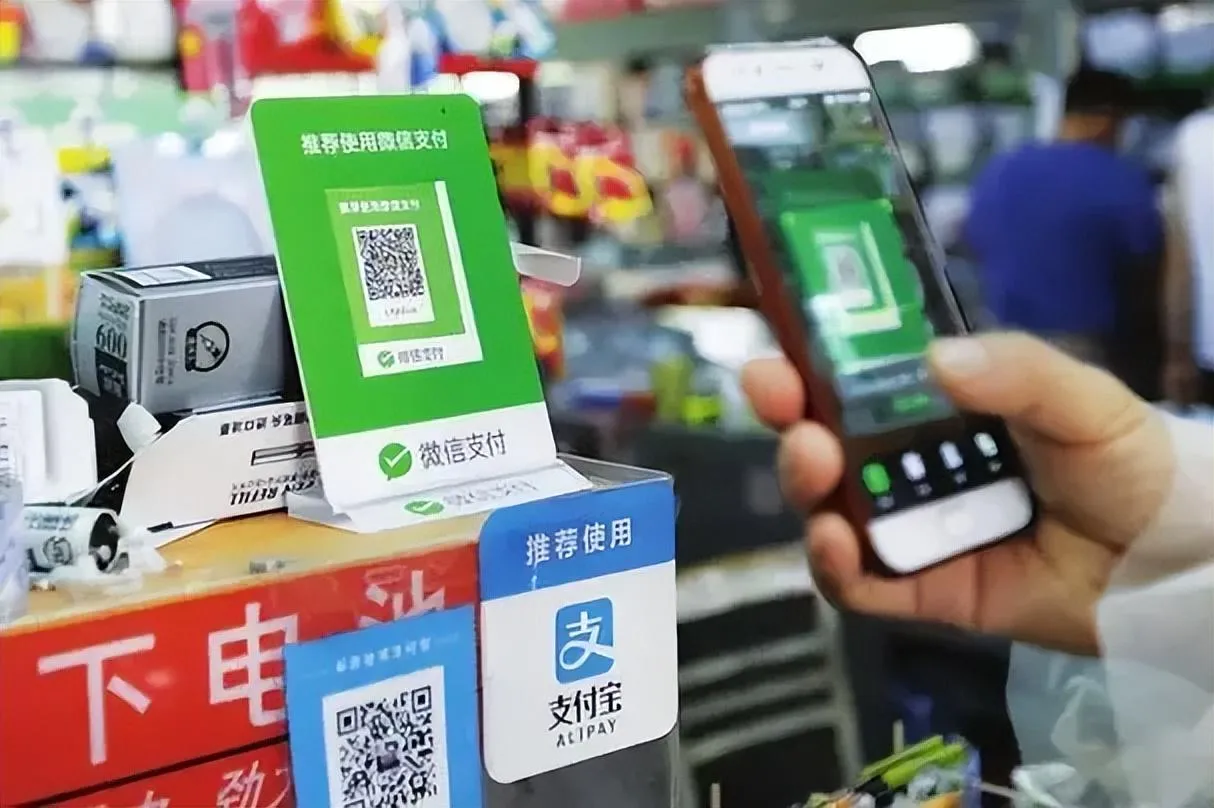 The green WeChat Pay QR code you will scan at shops, cafés, and street stalls — usually printed beside a blue Alipay code.
Other everyday scenarios:
- Subway & bus: Inside WeChat, search the “乘车码” (Transit Code) mini-program, switch to your city, and activate. Scan the code at the gate — works in most major cities.
- Ride-hailing: Use the DiDi (滴滴出行) mini-program inside WeChat, or the standalone DiDi app. Payment is charged to WeChat Pay automatically.
- Food delivery: Meituan (美团) for meals and groceries — pay with WeChat Pay at checkout.
- Train tickets: The official 12306 app lets you register with a passport, pass a facial-recognition check, and buy high-speed rail tickets paid via WeChat Pay. See our China train tickets guide.
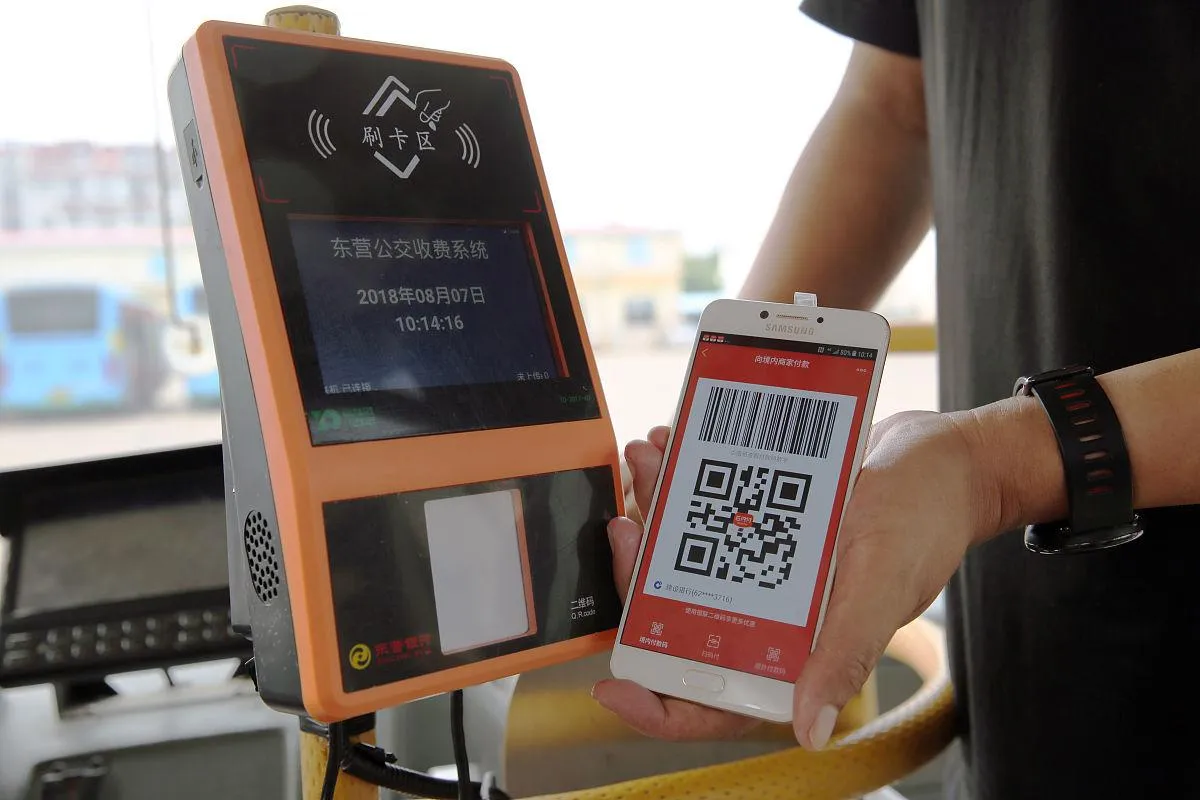 Tap your phone to ride — buses and subways in most major cities take WeChat Pay through a transit-code mini-program.
Mini-Programs: WeChat’s Secret Superpower
This is where WeChat Pay pulls ahead of Alipay, and it is the feature most foreign guides completely miss.
A mini-program (小程序) is a lightweight app that runs inside WeChat — you never download or install anything. Because WeChat is already the app Chinese people live in (chatting all day), the friction to jump into a mini-program is almost zero. The result is an ecosystem that is, in practical terms, more complete and more seamless than Alipay’s.
Inside WeChat you can, without leaving the app:
- Hail a ride — DiDi mini-program
- Order food delivery — Meituan or Eleme
- Book train tickets — 12306 mini-program
- Order at McDonald’s, KFC, or Starbucks — each brand’s mini-program, often with member discounts
- Pay for transit — city transit-code mini-programs
- Shop — JD.com, Pinduoduo mini-programs
The key advantage: you pay without ever switching apps or re-entering card details. You are already chatting with a friend about where to eat; one tap opens the Meituan mini-program, you order, and WeChat Pay handles it instantly. Alipay has mini-programs too, but because Alipay is a “purpose-built” payments app that people open, use, and close, it has weaker social stickiness. WeChat’s mini-program layer turns the whole app into a single, uninterrupted payments + services environment.
Since the 2023 opening, virtually every merchant that accepts WeChat Pay — including those inside mini-programs — also accepts international cards. So as a foreigner, the mini-program world is open to you too.
Limits and Fees (2026)
This is the section to read carefully, because the official limits and the real-world limits are very different, and that gap trips up a lot of travelers.
Official limits
| Type | Limit |
|---|---|
| Per transaction | ¥6,500 |
| Per month (cumulative) | ¥50,000 |
| Per year (cumulative) | ¥65,000 |
These were raised after the 2023 launch (the original figures were ¥6,000 per transaction and ¥60,000 per year — some older tutorials still quote those numbers).
The catch: real-world (risk-control) limits are much lower
This is the part official pages do not tell you. New and foreign-card accounts are subject to risk-control limits that are far below the official ceiling:
- A freshly bound card may be limited to roughly ¥300–500 per transaction, with a cap of around 3 transactions per day.
- Real users report an effective daily ceiling of about ¥1,000–3,000 in practice (one 2026 report described hitting a wall at ¥3,000 of daily spending on Taobao/JD).
- Limits grow over time as you use the account normally — think of it as “building trust.” Large purchases (¥3,000+) may be declined early on.
Practical takeaway: Expect modest daily spending at first, plan for cash or a Chinese friend’s help on big purchases, and let the account warm up with normal small transactions over your first days.
Fees
- ¥200 or less per transaction: no fee. WeChat absorbs the cost to encourage small, frequent payments.
- Over ¥200 per transaction: 3% fee. This fee is refunded proportionally if the transaction is canceled or refunded.
- 2025 promo: First-time card binders get a 60-day window where the 3% fee is waived on up to ¥1,000 of spending per day (max ¥30 saved per transaction). If you are visiting soon, binding early can save real money.
Exchange rate
WeChat Pay does not set its own exchange rate. The conversion is handled by your card network (Visa, Mastercard, etc.) and your issuing bank, at their rates — usually close to the mid-market rate.
Hidden cost to watch: If your credit card charges a foreign transaction fee (FTF) — typically 3% — you pay that on top of WeChat’s 3% on transactions over ¥200. For a China trip, use a no-FTF travel card if you have one; it roughly halves your effective cost on larger purchases.
WeChat Pay vs Alipay: Which Should You Use?
You do not have to pick — most seasoned travelers set up both. But if you only have time for one, here is how they compare:
| WeChat Pay | Alipay | |
|---|---|---|
| Foreign cards | Visa, Mastercard, Discover/Diners, JCB (Amex inconsistent — see below) | Visa, Mastercard, Discover/Diners, JCB, Amex (added 2025) |
| Mini-program ecosystem | Broader & more seamless (chat → service → pay in one app) | Large, but weaker social integration |
| Fees | ≤¥200 free, >¥200 = 3% | Same (≤¥200 free, >¥200 = 3%) |
| Per-transaction limit | ¥6,500 official (real-world far lower on new accounts) | Higher per-transaction ceiling once verified — see the Alipay guide |
| Best for | All-in-one super-app: services & mini-programs | E-commerce, clear transaction history, dedicated travel features |
The pragmatic answer: set up both before you arrive (start with our Alipay guide), keep a little cash as backup, and you will be unstoppable. WeChat Pay wins on ecosystem breadth; Alipay wins on payment-focused polish.
Common Problems and Fixes
Drawn from real reports on Chinese travel forums and expat communities:
“Card binding failed.”
- The #1 cause is a name mismatch. Copy the name from your card exactly — capitalization, spaces, hyphens, everything.
- The phone number must be the one your bank has on file. If you changed numbers, update it with your bank first.
- Prepaid, virtual, and some newly issued cards get rejected more often (this is card-BIN risk control). Physical, older Visa/Mastercard cards have the highest success rate. Wise cards work for some people and fail for others — results vary.
- Accounts registered with a Chinese ID have occasionally been restricted from binding foreign cards; accounts on a passport are more stable.
“My payment was declined / limit too low.”
- This is usually risk control, not a card problem. Make a few small successful payments to build trust, then retry.
- For genuinely large purchases (hotel, jewelry), split the payment or pay cash.
“Refund hasn’t arrived.”
- Refunds route back to your original card. Unbinding the card does not lose the refund — the back-office record remains.
- If the card refund fails, it falls back to your WeChat balance. If neither works, contact WeChat Pay support or the merchant.
“I was flagged after several small transfers.”
- Many small same-amount transactions (e.g., repeatedly buying ¥200 gift cards) trigger fraud detection. Avoid suspicious patterns, and do not use a foreign card for person-to-person transfers (which are blocked anyway).
Leaving China and Unbinding Your Card
WeChat Pay with a foreign card is designed for spending inside mainland China. There are a handful of overseas merchants that accept it (some spots in Singapore, for example), but coverage is nothing like inside China. Your account itself does not expire when you leave.
To unbind a card:
- Go to Me > Services > Wallet > Cards.
- Tap the card you want to remove.
- Tap ”…” (top right) → Unbind (解除绑定).
Unbinding is a front-end action only — it does not delete your transaction history, and pending refunds still process back to the original card.
To delete your WeChat account entirely: Me > Settings > Account & Security > WeChat Security Center > Security Tools > Cancel Account. Submission deletes the account within seconds, but you have a 15-day window to cancel (just log back in). After 15 days the deletion is permanent and the WeChat ID can never be reused.
Frequently Asked Questions
Do I need a Chinese phone number? No. Your home mobile number works, as long as it can receive the SMS verification code.
Can I send money to a Chinese friend with WeChat Pay? Not with a foreign card. Person-to-person transfers and red packets require a Chinese bank account. You can only pay merchants.
Why was I charged ¥0 after binding my card? That is a pre-authorization check. It is automatically released within about 30 days — it is not a fee.
Is WeChat Pay or Alipay better? Both. Set up both before you arrive. WeChat Pay has the broader in-app ecosystem; Alipay is the more focused payments tool. See our Alipay setup guide.
Will my card work? Visa and Mastercard work most reliably. Discover/Diners and JCB are officially supported on WeChat Pay. For American Express: Alipay added official Amex support in February 2025, and some travelers report it works on WeChat Pay too — but it is not consistently reliable on WeChat, so confirm in the app. When in doubt, bring a Visa or Mastercard as your primary card.
The Bottom Line
In 2026, WeChat Pay is no longer a locals-only club. With a passport, an international Visa or Mastercard, and ten minutes of setup before you fly, you unlock the full super-app experience — scan-to-pay everywhere, ride-hailing, food delivery, train tickets, and the mini-program ecosystem that makes WeChat more than just a wallet. Pair it with Alipay and a little backup cash, and payment will be the least of your worries in China.
Related Articles
- How to Set Up Alipay in China (2026) — Set up the other half of China’s payment twins
- What Apps to Download Before Going to China — The complete app checklist
- How to Get Internet in China — VPN, eSIM and connectivity
- China SIM Card vs. eSIM (2026) — Stay connected
- How to Use DiDi in China — China’s Uber, paid via WeChat Pay
- How to Buy China Train Tickets — High-speed rail, paid via WeChat Pay